Thứ Sáu, 1 tháng 6, 2012

Celebrate IPv6 Day with OpenWRT

As of Attitude Adjustment and Trunk this article is no longer applicable to set up 6in4 please refer to the new guide on OpenWRT WikiPages.

6 June is World IPv6 day.
Major ISPs, home networking equipment manufacturers, and web companies around the world are coming together to permanently enable IPv6 for their products and services by 6 June 2012.
However not all Internet Service Provider support IPv6 for home users, however you can still get an IPv6 connection working by creating a IPv6 in IPv4 tunnel.
This is known as 6in4.
Your IPv6 packets will be encapsulated in IPv4 and sent via a Tunnel Broker via Hurricane Electric.
Hurricane Electric provides free tunnel brokers for end users. 
TP-Link WR1043ND originally does not support IPv6 however by using the firmware Image I have compiled and share, you can create a 6in4 tunnel to enable IPv6.
This is because I included 6in4 as well as radvd packages.
This post will show you how to create a IPv6 tunnel broker and setup the OpenWRT router to provide IPv6 connectivity to connected wifi devices.
 
First go to http://tunnelbroker.net/ to register & create a free account.
After signing up, log in.
You can create up to 5 tunnels.
You may want to choose a tunnel server closest to your country you live in.


After creating the tunnel click on Main Page then click on the tunnel link (boxed in red).
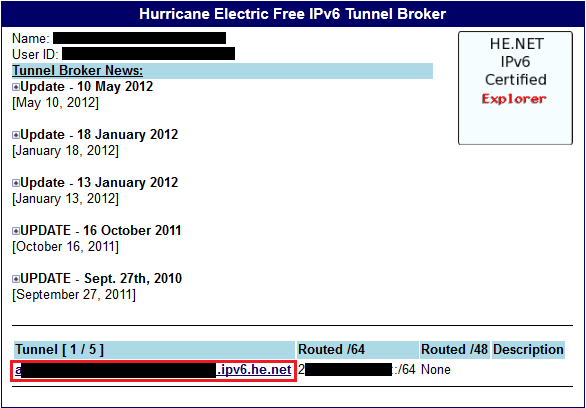

You will go to this page which contains all your tunnel configuration.


Click on Example Configuration and Select OpenWRT


Next Open Up OpenWRT LuCI Router Configuration Page and add a new Interface:


Name the new interface "henet"

Configure the interface:


Set Advance Settings:


Set Firewall Settings

Save and Apply.

In Altitude Adjustment a dnsmasq has a updated version called dnsmasq-dhcpv6.
If you want to use dnsmasq-dhcpv6 just add the 2 lines to your /etc/dnsmasq.conf
dhcp-range=2001:1234:5678:9101::,ra-names
enable-ra
The bold and underline octets refers to the HENET first 4 octets.
If you want to use radvd follow the guide below:

Now you need to configure Radvd to advertise the IPv6 Address to connected devices.
In OpenWRT choose Network -> Radvd


Follow the configuration below, remember to add 1 to the third octet, this is for a /64 IPv6 address only.
Click on the picture to zoom if you cannot see properly
 

Lastly click on interface -> lan
As above enter the same IPv6 address (35+1) in the IPv6 box


Remember to restart the interface and radvd.
You can now reconnect your wifi devices to the router.
It should be able to acquire IPv6 Addresses.
After that go to ipv6.google.com or www.kame.net/
For the webpages to display correctly your browser must be able to handle IPv6 as well.
Firefox, Internet Explorer and Chrome supports IPv6.

Thứ Bảy, 31 tháng 3, 2012

DEXOS :: Ubuntu 12.04 LTS (Precise Pangolin) Beta 2 | RELEASED


The Ubuntu team is pleased to announce the final beta release of Ubuntu 12.04 LTS (Long-Term Support) Desktop, Server, Cloud, and Core products.


Codenamed “Precise Pangolin”, 12.04 continues Ubuntu’s proud tradition of integrating the latest and greatest open source technologies into a high-quality, easy-to-use Linux distribution. The team has been hard at work through this cycle, introducing a few new features but mostly fixing bugs.


Direct-Link::
ISO 1.5Gb - Install/live DVD for PC (Intel x86) computers (standard download)
http://cdimage.ubuntu.com/releases/precise/beta-2/ubuntu-12.04-beta2-dvd-i386.iso
ISO 1.5Gb - Install/live DVD for 64-bit PC (AMD64) computers (standard download)
http://cdimage.ubuntu.com/releases/precise/beta-2/ubuntu-12.04-beta2-dvd-amd64.iso


Other Released::
http://www.ubuntu.com/testing
http://cdimage.ubuntu.com/releases/precise/beta-2/
Source-Info::
https://wiki.ubuntu.com/PrecisePangolin/TechnicalOverview/Beta2
http://fridge.ubuntu.com/2012/03/29/ubuntu-12-04-lts-precise-pangolin-beta-2-released/
Past-post::
http://dexviajiboy2.blogspot.com/2012/01/ubuntu-1204-lts-precise-pangolin.html

Thứ Hai, 26 tháng 3, 2012

FAST Public DNS Server (March 2012)


Public DNS Servers (Updated March 2012)

Provider Primary DNS Server Secondary DNS Server
Level31 209.244.0.3 209.244.0.4
Google2 8.8.8.8 8.8.4.4
OpenDNS 208.67.222.222 208.67.220.220
DNS Advantage 156.154.70.1 156.154.71.1
Norton DNS 198.153.192.1 198.153.194.1
ScrubIT3 67.138.54.120 207.225.209.77
OpenNIC4 69.164.208.50 216.87.84.211
Public-Root5 199.5.157.131 208.71.35.137
[1] The DNS servers listed above as Level3 will automatically route to the nearest DNS server operated by Level3 Communications, the company that provides most of the ISPs in the US their access to the Internet backbone.
[2] Google also offers IPv6 public DNS servers: 2001:4860:4860::8888 and 2001:4860:4860::8844.
[3] ScrubIT also offers "filtered" DNS servers that restrict access to pornographic and malicious web sites. Those DNS servers are 67.138.54.100 and 207.225.209.66 and you can read more about it here.
[4] The DNS servers listed here for OpenNIC are just two of many in the US and across the globe. Instead of using the OpenNIC DNS servers listed above, see their complete list of public DNS servers here and use two that are close to you. OpenNIC also offers some IPv6 public DNS servers.
[5] These Public-Root DNS servers are the only two currently operating in the United States but if you're located ouside the US, see their complete list here and choose the best servers based on your location.
 SOURCE::About.com-Guide

Thứ Ba, 20 tháng 3, 2012

USE KEYBOARD WITH MOUSE (ON SCREEN KEYBOARD)


Use Keyboard with mouse

If you feel that your external keyboard is not working properly or some particular key is not functioning then you can use internal keyboard on your desktop screen. This property of keyboard is found in windows xp and seven. Just follow these steps
Go to start menu and press “run
Type  “osk
Now press enter.
(note. Don’t use commas)
you will see keyboard on your desktop screen. Now use mouse to click on keys for operation.


Thứ Sáu, 9 tháng 3, 2012

INCREASE SPEED OF HARD DISK


INCREASE SPEED OF HARD DISK

It is common observation that some times our computer slows down due to low performance of hard drive. This problem happens due to the slow performance or poor speed of hard drive. When we say about poor performance, actually we mean, poor speed of reading/writing of hard drive. This problem can be solved by increasing the hard drive speed. Follow these steps to solve your problem.


Click Start menu and select run.
Now type (sysedit.exe) in run and press enter.
System configuration editor will appear.
Here you can see some multiple windows but you will select (system.ini).
This window contains a line (386enh)
Now after this line type (irq14=4096)
Now close this window and save it.
Reboot your computer now.
You will surely feel better performance of your computer.
Enjoy.

Thứ Tư, 7 tháng 3, 2012

DIFFERENCE BETWEEN TFT AND LCD.


DIFFERENCE BETWEEN TFT AND LCD.

This is a common question when have been asked about several times by many people. Every body wants to know that what is the difference between a LCD and TFT. So i figured out, i should answer this question for anyone who has doubts.

LCD stands for Liquid Crystal Display... and 
TFT stands for Thin Film Transistor.

TFT is not really different from LCD. It comes from the family of LCD technology. We can say that it is a modern version of the LCD Technology. A TFT provide a well improved image quality. 
There are two typs of display quality. 1st one is Matty and 2nd is Grossy. Matty display is called LCD and Grossy display is called as TFT. LCD and TFT consumes less power energy as compared to CRT (Cathode ray tube).
Now a days TFT has been used for mobile phone devices, projectors, nevigation systems as well as TVs and computer monitors.

Thứ Ba, 6 tháng 3, 2012

INSTALL WINDOWS XP FASTER


In this post I will tell you about installation of win XP in minimum time period. Normally when someone tries to install windows XP on computer, it takes around 30-40 min to complete entire setup. It is too much time to install windows setup. I will tell you a method to install windows more faster. It will take approximately 15 minutes to complete windows installation. So to install win XP in short time please follow these steps.


Power on your computer and start with bootable windows XP cd
In first step window will load installation files.
Select any drive ( C: ) for installation.
Select NTFS to format the partition.
Setup will copy files on this drive and it will try to restart PC.
After restarting when you see Xp logo, press (Shift+F10).
It will open (CMD) prompt.
In CMD prompt type (Taskmgr)
It will open task manager. Now go to “process” tab and find “Setup exe” Right click on setup.exe and select “Set priority”
You will see a submenu. Here priority will be normal. Select priority to (High)  or above (Normal).
Done. 

This will complete installation process much faster than the normal original time.
Try it….......