Hiển thị các bài đăng có nhãn aspire 4740. Hiển thị tất cả bài đăng

Thứ Sáu, 20 tháng 8, 2010

Acer Aspire 4740G on OpenSUSE (Perfect Linux Machine)


As I said AS4740 works well with Linux but you still need to do some tweaking for full functionality.
A lot of things you do with AS4530 is done with AS4740 to achieve full multimedia capability.

Edit: As with the new release openSUSE there are some updates:
1)Multimedia configuration is as shown below still the same manual work due to GPL.
2)Edit Nvidia Driver Repo is up just add the server and install the drivers.
3)You no longer need acpi_vendor commandline...issue resolved
4)Touchpad still jumpy with 2 fingers...
5)Atheros Driver no compiling required since the drivers work pretty well out of box.

In conclusion it is a great release solving some of the issues above just that the nvidia delay is a show stopper. I always like openSUSE elegant way of pushing down Nvidia Driver by server repo too bad they didn't get it out the same time as the distro release.

Lets get started:

First go to OpenSUSE to download their Live CD for 32/64bit according to your needs.
The LiveCD is the size of a Normal CD and just what you need to install OpenSUSE, the DVD format is a waste of bandwidth and a overkill.

Everything works out of box except the display driver.

Things that need tweaking:
  • Nvidia Propriety Drivers.
OpenSUSE is interesting because Nvidia provides the driver updates from their own server.
Other Distro like Ubuntu has a 3rd party maintaining the driver but not OpenSUSE however due to licensing issues they cannnot include it in the default install.

After installing add the Nvidia Server to the repository
SYSTEM,  SYSTEM ,YAST

Software,Software Repo

Add
Protocol:HTTP
Server:download.nvidia.com (See Nvidia provides the direct package)
Directory on Server: /opensuse/11.2
Accept the Server Key (because you trust the server)
From the YAST Menu, Select Software Management search for the Nvidia Driver and install it.
The kicker is that OpenSUSE software updates is IRRITATINGLY SLOW.
So bear with it.

After installing and rebooting it will be automatically activated.


  • Restricted Formats
Due to licensing issues OpenSUSE doesn't have restricted format support out of box but they are downloadable here (Unfortunately the libraries broke the cheese webcam functionality).

Edit: To prevent breaking of the cheese webcam functionality do the following:

Add VLC to the software repository(Use VLC to play all your future videos)
Then use Fluedo Codec for Banshee
After this the webcam functionality will be preserved.

You might also want to do the following configuration of the conf files below.

Edit: /etc/sudoers
Append "DISPLAY" as shown below
Defaults env_keep = "LANG LC_ADDRESS LC_CTYPE LC_COLLATE LC_IDENTIFICATION LC_MEASUREMENT LC_MESSAGES LC_MONETARY LC_NAME LC_NUMERIC LC_PAPER LC_TELEPHONE LC_TIME LC_ALL LANGUAGE LINGUAS XDG_SESSION_COOKIE DISPLAY"

The reason so you can sudo something in GNOME Desktop Mode.

Edit /etc/fstab
Add noatime to the line of your main disk partition so it will not write last access date to your Harddisk (Less unnnessary harddisk operations)

Add this line to /etc/fstab to make /tmp folder a RAMDisk so /tmp will be automatically cleared during shutdown.
tmp              /tmp            tmpfs    defaults,size=512m,noatime,nodiratime    0 0
The size allocated is 512MB.
Open YAST select bootloader
Rename the Windows 7 Entry to something you like.
Rename the OpenSUSE Entry to something you like. 
Set the default OS to something you use more often.
Add acpi_osi=Linux to the end of the OpenSUSE boot parameters


Issue #1 Touchpad Multi-Touch (There is still a problem with jumping cursors with multi fingers so it is better to revert to Scroll Bar it should be fixed in the future) :

Create a config file using the data below.
Name it: 11-x11-synaptics.fdi
copy it to the following folder with root permission:/etc/hal/fdi/policy


The synaptics pad may not support true multitouch. However, we emulate multitouch when the width of the touch is greater than 6 units:
<?xml version="1.0" encoding="ISO-8859-1"?>
<deviceinfo version="0.2">
<device>
<match key="info.capabilities" contains="input.touchpad">
<merge key="input.x11_driver" type="string">synaptics</merge>
<merge key="input.x11_options.SHMConfig" type="string">On</merge>
<merge key="input.x11_options.EmulateTwoFingerMinZ" type="string">50</merge>
<merge key="input.x11_options.EmulateTwoFingerMinW" type="string">5</merge>
<merge key="input.x11_options.VertTwoFingerScroll" type="string">1</merge>
<merge key="input.x11_options.HorizTwoFingerScroll" type="string">1</merge>
<merge key="input.x11_options.TapButton1" type="string">1</merge>
<merge key="input.x11_options.TapButton2" type="string">3</merge>
<merge key="input.x11_options.TapButton3" type="string">2</merge>
</match>
</device>
</deviceinfo>
 

Then enable 2 finger scroll as shown below

Issue 2: Brightness Control
Add the follow to the Boot Loader Command Line as shown below
: acpi_backlight=vendor
Issue 3: Weak Wireless Signal
Add Atheros Repository to YAST


Then go to the install software menu it will recommend you to install atheros driver and madwifi.
However this doesn't solve the issue as signal is still weak you must grab the latest driver from source and compile it.
Sounds tough? It is actually quite simple.

Compiling it yourself using the sources

  • Make sure you have installed those packages: gcc, gcc-g++, make, kernel-source, kernel-XXX-devel (where XXX is the type of your kernel, for example if you use kernel-desktop kernel install kernel-desktop-devel package). If not, please install them using YaST.
  • Download the current drivers directly from MadWifi Project.
  • Unpack the archive in a temporary folder.
  • Open up a terminal window.
  • Switch to the temporary folder, and type in,
$ sudo make 
$ sudo make install
 
To load the new driver modules simply restart if you do not want to load the driver module manually.

Issue 4 Microphone
This is simply just set as shown below

For best Font Display use the following Settings in Appearance:
Select Detail


Select Slight Hinting or None instead of Full

Thứ Bảy, 26 tháng 6, 2010

Acer Aspire 4740G Review

There is 1 confirmed bug on the Acer Aspire 4740/4740G Insyde EFI Firmware.
Bug 1:
DEP is disabled due to firmware bug.
This will have potential security implications on this laptop.
Update: Acer has already fixed it with a firmware update.


Bug 2:
They didn't remap the memory properly resulting in not all 4GB fully utilised. By rights if they are not going to utilise Intel HD Graphics they should have allocated 0MB to the Intel Graphics DVMT(or let user decide by enabling the menu in EFI setup menu).

I got my hands on one of the newer Acer Laptop: Acer Aspire 4740G
This is a rather cheap laptop with rather good specifications.
I won't be posting any picture of this laptop as you can google how it looks yourself.
To me performance is a more vital information source.
The specifications are as follows:

Operating System
Processor & Chipset
  • Intel® Core i3-330M processor (2.26 GHz, DDR3 1066 MHz, 3 MB L3 cache), supporting Intel® 64 architecture, Intel® Smart Cache
  • Mobile Intel® HM55 Express Chipset
Memory
  • Up to 4 GB of DDR3 memory
Optical media drive
  • 8X DVD-Super Multi double-layer drive
Storage
  • Up to 640GB hard disk drive
  • Multi-in-1 card reader, supporting Secure Digital™ (SD), MultiMediaCard (MMC), Memory Stick® (MS), Memory Stick PRO™ (MS PRO), xD-Picture Card™ (xD)
Display
  • 14" HD 1366 x 768 pixel resolution, Acer CineCrystal™ LED-backlit TFT LCD, supporting simultaneous multi-window viewing via Acer GridVista™
  • 16:9 aspect ratio
  • 8 ms response time
Graphics
  • NVIDIA® GeForce® 310M with 512 MB of dedicated DDR3 VRAM, supporting NVIDIA® CUDA™, PhysX™, PureVideo® HD technology, OpenEXR High Dynamic-Range (HDR) technology, Shader Model 4.0, Microsoft® DirectX® 10.1
  • Dual independent display support
  • 16.7 million colors
  • MPEG-2/DVD decoding
  • WMV9 (VC-1) and H.264 (AVC) decoding
  • HDMI™ (High-Definition Multimedia Interface) with HDCP (High-bandwidth Digital Content Protection) support
Audio
  • Dolby®-optimized surround sound system with two built-in stereo speakers
  • Optimized 3rd Generation Dolby Home Theater®7 audio enhancement, featuring Dolby® Digital Live, Dolby® Pro Logic® IIx, Dolby® Headphone, Dolby® Natural Bass and Dolby® Sound Space Expander, Dolby® Audio Optimization, Dolby® High Frequency Enhancer technologies
  • True5.1-channel surround sound output
  • High-definition audio support
  • S/PDIF (Sony/Philips Digital Interface) support for digital speakers
  • MS-Sound compatible
  • Acer PureZone technology with two built-in stereo microphones, featuring beam forming, echo cancellation, dynamic gain control (TBC), and noise suppression technologies
Communication
  • Acer Video Conference1, featuring:
    • Acer Crystal Eye webcam with 640 x 480 resolution
    • Acer PureZone technology
  • Acer InviLink™ Nplify™3 802.11b/g/Draft-N Wi-Fi CERTIFIED® network connection, supporting Acer SignalUp™ wireless technology or
  • Intel® Centrino® Advance-N 6200 a/g/n Wi-Fi CERTIFIED™ network connection with Acer Nplify™, supporting Acer SignalUp™ wireless technology, and featuring MIMO technology
  • Bluetooth® 2.1+EDR (Enhanced Data Rate)
  • Gigabit Ethernet, Wake-on-LAN ready
  • 56K ITU V.92 with PTT approval12, Wake-on-Ring ready
I/O Interfaces
  • Multi-in-1 card reader (SD™, MMC, MS, MS PRO, xD)
  • HDMI™ port with HDCP support
  • Three USB 2.0 ports
  • External display (VGA) port
  • Headphone/speaker/line-out jack with S/PDIF support
  • Microphone-in jack
  • Line-in jack
  • Ethernet (RJ-45) port
  • Modem (RJ-11) port
  • DC-in jack for AC adapter
Security
  • Acer Bio-Protection fingerprint solution, featuring Windows® logon, computer protection, FingerLaunch, ProfileLaunch, MusicLaunch, Password Bank, MyLaunch, FingerNav
  • BIOS user, supervisor, HDD passwords
  • Kensington lock slot
Power supply and battery
  • ACPI 3.0 CPU power management standard: supports Standby and Hibernation power-saving modes
  • 48.8 W 4400 mAh 6-cell Li-ion battery pack: • 3-hour battery life
  • 3-pin 65 W AC adapter
  • Energy Star®
Keyboard & Special Controls
  • 86-/87-/91-key keyboard, with inverted "T" cursor layout
  • Multi-gesture touchpad pointing device supporting:
    •Circular-motion scrolling •Pinch-action zoom •Page flip
  • 10 function keys, four cursor keys, two Windows® keys, hotkey controls, independent standard numeric keypad, international language support,
  • Easy-launch buttons: WLAN, Bluetooth®, programmable key, file backup, volume up, volume down, touchpad lock
  • Media control keys (printed on keyboard): play/pause, stop, previous, next
Weight and dimensions
  • 342 (W) x 239 (D) x 23/38.6 (H) mm (13.4 x 9.4 x 0.9/1.5 inches)
  • 2.3 kg with 6-cell battery
Software
  • Acer Arcade™ Deluxe featuring Cinema, Album, Music, HomeMedia, Online Media
  • Acer Bio-Protection
  • Acer Crystal Eye
  • Acer GridVista™
  • Acer GameZone
  • Acer Game Console
  • Acer Launch Manager
  • Acer Backup Management
  • Acer ePower Management
  • Acer Recovery Management
  • Adobe® Reader®
  • Adobe Flash® Player
  • Google Toolbar™
  • Google Desktop™
  • McAfee® Internet Security Suite Trial
  • NTI Media Maker™
  • Microsoft® Works with Office Home and Student 2007 Trial
  • Microsoft® Windows Live™ Essentials
Warranty
  • One-year International Travelers Warranty (ITW)
Here is a more detailed specification from probing the hardware with Everest:

CPU Properties:


CPU Type   2x , 2133 MHz


Instruction Set   x86, x86-64, MMX, SSE, SSE2, SSE3, SSSE3, SSE4.1, SSE4.2


Original Clock   2133 MHz


L2 Cache   256 KB (Asynchronous)


Multi CPU (HyperThreading, Actual No. of Cores:2):


CPU #1   Intel(R) Core(TM) i3 CPU M 330 @ 2.13GHz, 2128 MHz


CPU #2   Intel(R) Core(TM) i3 CPU M 330 @ 2.13GHz, 2128 MHz


CPU #3   Intel(R) Core(TM) i3 CPU M 330 @ 2.13GHz, 2128 MHz


CPU #4   Intel(R) Core(TM) i3 CPU M 330 @ 2.13GHz, 2128 MHz


Video Adapter Properties:


Device Description   NVIDIA GeForce 310M


Adapter String   GeForce 310M


BIOS String   Version 70.18.3f.0.a


Chip Type   GeForce 310M


DAC Type   Integrated RAMDAC


Driver Date   16/3/2010


Driver Version   8.17.11.9716 - nVIDIA ForceWare 197.16


Driver Provider   NVIDIA


Memory Size   512 MB
Monitor Properties:


Monitor Name   Generic PnP Monitor [NoDB]


Monitor ID   AUO183C


Manufacturer   B140XW01 V8


Manufacture Date   Week 1 / 2009


Serial Number   None


Max. Visible Display Size   31 cm x 17 cm (13.9")


Picture Aspect Ratio   17:9


Gamma   2.20


DPMS Mode Support   None
Harddisk Controller:


Driver Description   Intel(R) 5 Series 4 Port SATA AHCI Controller


Driver Date   3/3/2010


Driver Version   9.6.0.1014


Driver Provider   Intel


INF File   oem8.inf
Windows Experience Index

Note: The harddisk is a upgraded WD BEKT 7200RPM 16MB Buffer Drive the default 5K500 Hitachi Drive doesn't give as much performance
3D Mark 06 Scores


CPU
The New Arrandale CPU i330 M330 (the lowest end)
The Throttling States is as follows:
Lowest Frequency: 1200MHZ Multiplier: x9.0  
(In between Multiplier changes from x9.0 to x16.0 depending on CPU Usage thus conserving power,
however sometimes it hits x7.0 Multiplier could be a bug,
QPI is fixed and no more Front Side Bus)
Maximium Frequency: 2100MHZ Multiplier: x16.0

It is Physically a Dual Core CPU with 2 Hyperthreading Cores so 4 Logical Cores in Total

Graphics SubSystem
Note: 
There maybe some errors regarding PhysX. Official Statement about PhysX is only 32 CUDA Cores GPUs are supported however G 310M only has 16 CUDA Cores. But I have tested AS4740G and it DOES support PhysX using the latest Nvidia 257.21 driver but I wouldn't count on the performance.
 
GPU is soldered to the board as VGA BIOS/Firmware cannot be read by GPUZ the normal way. Also Soldered GPUs can reduce the pricing of the laptop therefore this can explain the cheap price of Acer Aspire 4740G.
Below is a picture of the GPU and CPU
Note GPU is soldered onto the mainboard therefore NOT UPGRADEABLE.
CPU is a PGA Socket hence UPGRADEABLE.


Although the laptop has Intel HD Graphics onboard the CPU (see the 2 die above?), it is not activated or detected, you can pray that Acer will release a BIOS, no sorry EFI Firmware that will unlock Optimus or Switchable Graphics BUT from my past experience with Acer chances are as good as striking lottery...
New:
IRONLAKE-MOBILEd.0.Ä.C.0...................BIOS_DATA_BLOCK ˜...”.þê..d....1914Intel(R)Ironlake Mobile PCI Accelerated SVGA BIOS..Build Number: 1914 PC 14.34  10/15/2009  11:37:51..DECOMPILATION OR DISASSEMBLY PROHIBITED..............Co
I found the above VGA ROM (IRONLAKE is the Intel Code Name for Intel HD Graphics onboard the Intel Core iX CPU) data inside the BIOS dump which indicate Acer Aspire 4740G CAN ACTUALLY SUPPORT switchable except Acer disabled the ability in the EFI/BIOS.

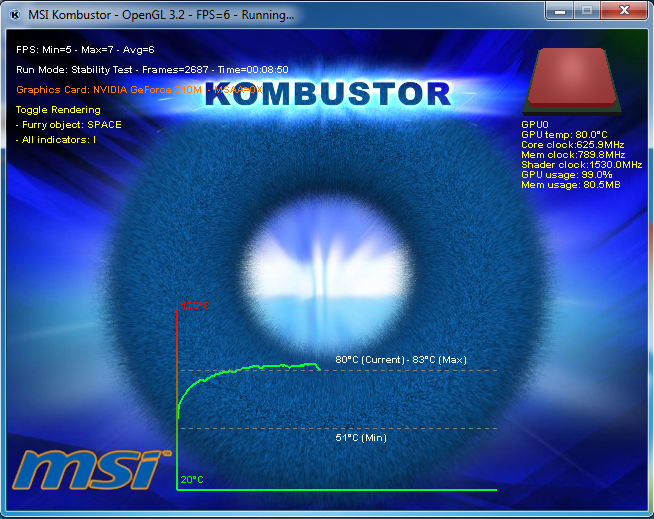
Temperature Dissipation Test
This is a new Test I devised to measure how well the unit dissipate heat it can produce at maximium performance:

My opinion on this result is that this Acer Aspire 4740G handles heat pretty decently.
Considering that Acer uses Thermal pad on the GPU this is a very good result.
I estimate if the thermal pad is replaced by a Copper Shim temperature will fall by a good 10 degrees.
Only real Tests like the one I conducted can accurately determine if a particular model potentially has thermal issues, not old grandmother stories like how my Acer from 10 years ago overheat therefore all Acer overheat(This is a flawed argument by the way).
Anyway a computer that cannot dissipate the heat it produces is as good as a man who can't wipe his own backside (Acer Aspire 4530), so this laptop does pretty well.


Kombustor rate of temperature rise graph:


3 PowerMizer States are as shown below:

CUDA Capabilities as shown below:
It seems to indicates a decent CUDA Device.


Power Consumption Max Load Mode (Using JouleMeter from Microsoft Research)


 Power Consumption Idle Mode(JouleMeter from Microsoft Research)


So there you go all the information you need to consider this laptop for usage.

If you know how to reinstall an Operating System, always do a clean install for better performance.
Why, because if you go Windows Hardware Developer Central there is a report that stated over 80% of OEM Imaged Computers has lousier performance than a Clean Windows Installation. 
I believe this is due to OEM Crap pre-installed in the computers.
Remember to run idle task and defragment the harddisk so AFTER installing all drivers to ensure optimal performance.
If you want to do a clean install you can use the list below as a driver checklist.
Or click here for links to latest greatest driver. 
  1. Intel Chipset Driver
  2. Intel Rapid Storage Driver
  3. Intel Management Engine
  4. Nvidia Graphics Driver
  5. Nvidia High Definition Audio Driver
  6. Realtek High Definition Audio Driver
  7. Acer Launch Manager
  8. BroadCom Bluetooth Driver
  9. Finger Print Driver (Available from Windows Updates)
  10. SuYin/Chicony WebCam Driver
  11. Conexant Modem Driver
  12. Synaptics/ALP Touchpad Driver
  13. Intel Management Engine Controller
  14. BroadCom NetLink LAN Driver
  15. Atheros/Intel Wireless Driver
  16. Realtek Card Reader Driver
  17. Acer Smart Power Manager & Optical Driver Power Manager
Conclusion about whats great and what sucks
What's Great:
1)This laptop although armed with the lowest end Core i3 Processor can even outmuscle any AMD Turion II Mobile Processor so you might want to reconsider buying any Turion II laptops.
It says something when you find a Turion II M 660 Flagship Processor can't beat the lowest end Intel Core i3 330M Processor. It says even more when the Turion II equiped laptop (4540G) cost more than this laptop (4740G).
2)The Audio is fantastic: Subwoofer + Bass on a 14 inch laptop (5.1 Surround Sound See Below)
You need to use MSI Audio Drivers to get the real potential. It comes with a 5 Ohm 2 Watt speaker instead of the usual 4 Ohm 2 Watt. New Realtek Driver Audio Mod for Better Sound


3)Solid hinge from older Gemstone.
4)Cheap price for a Intel/Nvidia combo laptop.
Remember Nvidia Always has better drivers than ATi on both Linux and Windows.
5)Awesome heat vent much better than previous designs.
6)Easy to access bottom panel for fast component upgrades
7)Ultra Slient Exhaust Fan even when spinning at Full Speed.

What Sucks
1)The touchpad looks silly because when you use 2 finger scroll, the etches for the Touchpad 1 Finger slide seems pointless
2)Sound is not so good maybe because the drivers have not yet been stably corrected.
3)Fingerprint Magnet Monitor bezel.
4)WebCam driver image quality not quite there, needs better drivers.

What's Controversial
1)The new 14 inch form factor has lower height but broader breath, personally I like it as this gives it a more compact look like a 13 inch which give better mobility but the total screen area is conserved.
2)Keyboard needs some getting use to (Sort of VAIO/Macbook style keyboard I am too used to the old Acer Style)
3)Battery life is around 3 hrs on the default battery but I know it is possible to buy 12 Cell Batteries on Ebay to equip this laptop.
4)RW-Everything reported this laptop can support up to 16GB after BIOS data analysis but only 2 Physical Slots are available so it should take a Max of 8GB only.

Bottomline:
I don't think anyone can find an Arrandale Based Laptop with decent Nvidia Graphics for the same price Acer placed on this laptop so yea this is it.

If you already own this laptop you might be interested in Optimizing the System Disk & Touchpad Configuration and installing OpenSUSE on AS4740

Changing the BackUp Button to open other applications (Using Zune as an Example)
Note: This will only work if you install the LauchManager from Acer Aspire 4540G.
<------------------(Start Copying after this Line)------------------>

Windows Registry Editor Version 5.00

[HKEY_LOCAL_MACHINE\SOFTWARE\Wow6432Node\Compal\LManager\Settings\Buttons\Backup]
"Command"="C:\\Program Files\\Zune\\Zune.exe"
"Command Type"="1"
"Label"="Zune"
"Remote Code"="C008"
"Description"="Zune Media Player"
"Configable"="1"
<---------------------(Stop Copying Before this line)------------------------->


Thứ Sáu, 4 tháng 6, 2010

Simple Way To Improve Laptop Battery Life For Arrandale CPU

There is actually a simple way to improve Mobility Life on Laptop with the Mobile Core i3/5/7 CPU.
Windows Vista/7 Power Plans have often been overlooked.
If you checked the new Arrandale CPUS they have unique characteristics.
They have multiple Power-States that varies by multiplier so any Power State you set will be available instead of only having 3 fixed discrete Power States.
So 1 advantage you can take of this is to limit the Maximum Processor state in Windows 7 Advance Power plan.

I am sure many of you don't game on a battery supply therefore on Mobile usage on Battery usually all work that is done is usually Office Typing and WebSurfing that do not require the processor to run at maximum capability.
The good part about Arrandale is you gain what you set.


Meaning when you set 40% Maximium Processor state on battery the CPU clocks exactly at 40% of Max Processor state instead of a lower Power State thus making this a viable solution to power saving.


Formula: Core Speed = Bus Speed X Multiplier

On older Processors like the Core 2 Duo and the Turion II and Turion I this is not a good solution because when you set at X% the processor will lock its maximum at the Power State rounded of to the nearest Power state so you encounter more performance penalty. For the Core i3 330M this is not an issue because the multiplier scales very well as show below the frequency varies linearly.

Refer to the scaling comparison below to see the difference

Thứ Năm, 27 tháng 5, 2010

Acer Aspire 4740G EFI and Memory Bug

SOLVED:
Acer sent me a EFI/BIOS Version 1.07 which fixed the DEP issue however no ability to activate switch able graphics was provided and 256MB is still being mysteriously eaten up by Intel HD Graphics.
It is officially out now in Acer Support Site so download from there directly.
Found a bug in Acer Aspire 4740G EFI Bug
From Intel Spec Site
http://ark.intel.com/Product.aspx?id=47663
The i3 330M Processor supports
Execute Disable Bit Yes

To verify this on your own Acer Aspire 4740/4740G
Download Securable here.
To access the Windows Advance Menu, Go to Control Panel >> System >> Advance System Settings >> Advance >> Performance Settings >> Data Execution Prevention.
Why is this vital?
Data Execution Prevention improves system security by flagging non executable code as non executable so malicious code cannot buffer overrun into execution hence if Acer really screwed this up Acer Aspire 4740G security could be potentially at risk.


I took a look into the EFI Firmware this is the feature which is not enabled:
Use XD Capability [Enable/Disable Processor XD Capability]
XD refers to Intel eXecute bit Disable Bit.

Add 1 more bug to the mix:


Acer if you are reading this and is sorry about the surprises you sprang please enable the Intel HD Switchable Graphics in the BIOS as an Apology to all AS4740 owners. I know it is there.
Either you remove Intel HD Graphics Memory reserve or you enable Switchable.
The Switchable Graphics Capability is as shown in the EFI firmware:
Set Display Mode Configure Type Integrated Graphics Discrete Graphcis Switchable Graphics

Thứ Hai, 24 tháng 5, 2010

Acer Aspire 4740G Optimal Drivers

If your EFI/BIOS version < 1.05 please update the firmware to enable DEP.
Because I am using AS4740G therefore I will be sharing my Driver Findings here.
  1. Intel Chipset Driver (Acer)
  2. Intel Rapid Storage Driver http://www.station-drivers.com/page/intel%20raid.htm
  3. Intel Management Engine http://www.station-drivers.com/page/intel%20chipset.htm
  4. Nvidia Graphics Driver http://www.nvidia.com/page/drivers.html
  5. Nvidia High Definition Audio Driver (Included in the Display Driver)
  6. Realtek High Definition Audio Driver http://aspiregemstone.blogspot.com/2010/08/audio-driver-matching.html (Why this driver is the best? The MSI Gaming Notebook using this driver uses the same AL888 Realtek High Def chip, it has excellent driver customisation better than Acer Drivers)
  7. Acer Launch Manager (Get it from Acer Site Don't use the 4740G Launch Manager use the 4540G if you want to customise the Backup Manager Shortcut Key)
  8. BroadCom Bluetooth Driver (Get it from Acer Site driver updatedness doesn't matter too much)
  9. Finger Print Driver (Available from Windows Updates Optional Driver updates)
  10. SuYin/Chicony WebCam Software
  11. Conexant Modem Driver (Get it from Acer Site driver updatedness doesn't matter too much who the h*ll uses Modem nowadays anyway??)
  12. Synaptics/ALP Touchpad Driver http://aspiregemstone.blogspot.com/2010/03/must-see.html
  13. Intel Management Engine Controller (Acer)
  14. BroadCom NetLink LAN Driver (Get it from Acer Site driver updatedness doesn't matter too much)
  15. Atheros/Intel Wireless Driver http://www.station-drivers.com/page/atheros.htm http://www.station-drivers.com/page/intel%20lan-wan.htm
  16. Realtek Card Reader Driver (Get it from Acer Site driver updatedness doesn't matter too much)
  17. Acer Smart Power Manager & Optical Driver Power Manager (Get it from Acer Site)
  18. Turbo Boost (Only for Core i5/7) (Acer)

Thứ Ba, 18 tháng 5, 2010

Modified RAM Timing using Thaiphoon Burner

 used Thaiphoon Burner 6.6 to do this the new 6.8 feature locked full SPD Rewrite.
Original:
Final
(I reverted to this SPD after someone reminded me that Core i3 only has a 1066MHZ Memory Controller):

Thứ Ba, 13 tháng 4, 2010

Dissemble Acer Aspire 4740G

I have dissembled the Acer Aspire 4740G and clean up the internal crap from Acer.
Here is the preview of the temperature improvements
Dissembled Picture:

Look at the shody application of thermal paste it is a total mess

Close up view of the mess Acer Made (Too much thermal gunk inhibits thermal transfer)


After I cleaned up all the thermal crap.The chip surface is mirror shine.

I used Brasso to remove the tarnish Copper Stain on the heatsink and made it mirror shine as well.
(After using Brasso I used Isopropyl Alcohol to clear up all traces of Brasso)


Temperatures Before Clean Up


Temperatures After Clean Up:


The famous MSI Kombuster Temperature Graph