Hiển thị các bài đăng có nhãn Laptop. Hiển thị tất cả bài đăng

Thứ Năm, 27 tháng 6, 2013

Change BIOS Splash On Lenovo Government Laptop.

Before starting up with the tutorial you need to download three files which is available here : Download

Step 1 : Backup Your Current BIOS Screen.

  • Extract The Downloaded File Named "Universal BIOS Backup ToolKit 2.0"
  • Right Click On The EXE file and Run it as Administrator. 
  • Now Click Read Button
  • Once the read process is complete click on the Backup button and save that file in a safe place. This is the Backup of the original BIOS. 
  • Backup Process Is Complete

Step 2 : Customize The BIOS.

  • Make a copy of your bios file that we made in the previous step and name it "44CN43WW.fd".
  • Now extract the "Ezh20.zip" File to get the BIOS editor.
  • Run EZH20.exe as Administrator. 
  • In the EZH20 window, select File -> Load file and select the renamed "44CN43WW.fd" file
  • Now the editor will show you the file's properties. Click Ok.
  • Now go to Components -> Logo and You'll see something like shown below.

  • You should click the "Image Information" drop-down and select the JPG(1024*768) option.
  • Now in the "Logo Image To Load" section, click "Browse" and select the image file you need to use. (Scroll down for a few splash screen images I made in the correct format or go to the next section to know how to make your own image as using incorrect format will damage your BIOS.)
  • Now click on "Patch" and wait (do not click or move anything at all) till it completes. It should say "FD file modify finished" on the bottom left.
  • Now select the option File -> Save and wait till it says "FD file save data finished" on the bottom left.
  • Now you can close the window. You have finished replacing the splash screen.

Creating Our Custom BIOS Screen

  • Open Photoshop and select the File -> New option with the below settings exactly.

  • Create whatever artwork you like, taking note that the right bottom corner will get cut off a little so don't put anything much in the right bottom.
  • Do not make your artwork too complex and avoid gradients or using too many colors. The flatter the colors the better. This is because the image file size must not be too high. If it becomes too high, there won't be enough space on the EEPROM chip where the BIOS is saved and it might corrupt your BIOS making it unable to boot. So just keep your artwork as minimal as possible.
  • Now you must resize your image to 1024x768 px (to avoid stretched look, we work on 1366x768 px and resize to 1024x768 so that even though the output after this step will look stretched, when booting it will look normal.)
  • To resize, go to Image -> Image size and in the dialog box, untick "Constrain proportions" checkbox (Important) and in width box enter 1024 and leave the height box at 768.
  • Choose the option File -> Save As and select any name for your image file and select the format as "BMP" from the drop-down menu.
  • On the next dialog box, choose 16 Bit as color depth and Windows mode as shown below.


  • Now use this saved image to load to the customized BIOS Splash
  • Or Use Any Of This I Designed, Download here : Images

Step 4 : Flashing a customized BIOS file

  • Right click the file "1DCN26WW.exe" That You've downloaded. Using 7Zip, extract the contents of the file. 
  • In the extracted folder delete the 1DCN26WW.fd file.
  • Copy the customized BIOS file "44CN43WW.fd" into this folder.

  • Now make sure your laptop is charged more than 30% AND ALSO connected to a charging port via the AC adapter. Otherwise the Flashing utility will NOT start. Also make sure not even one window is open as it will cause problems when the laptop tries to automatically restart.
  • Run the InsydeFlash.exe File as administrator.
  • Click OK to flash your BIOS. Do not touch your track-pad, mouse or keyboard until the laptop completes the automatic restart.


Chủ Nhật, 4 tháng 4, 2010

Toshiba Satellite L505-GS5037 TruBrite 15.6-Inch Laptop


The Toshiba Satellite L505-GS5037 TruBrite 15.6-Inch Laptop 15.6-Inch Laptop offers solid performance and an impressive affordable price. The Toshiba Satellite L505-GS5037 laptop is a great pick for handling school and work-related assignments. This laptop even works great at home. Whether you're surfing for leisure time, downloading videos or music, managing household finances or studying for finals, this laptop will serve you great. This laptop is fully functional, all-purpose, eco-smart machine that features a brilliant 15.6-inch display with 720p native high-definition resolution. And not only that, the L505 features an amazing high-gloss Fusion Finish in Graphite Gray that will surely get people a second look at your notebook. Dimensions: 10.2 x 15.1 x 1.6 inches and it weighs 6 pounds.

Technical Details:
2.13GHz Intel Core i3-330M Processor
4GB 204-Pin DDR3 SO-DIMM Memory
500GB Serial ATA Hard Disk Drive (5400RPM); DVD SuperMulti Drive with Labelflash supporting 11 formats
15.6" CCFL (16:9) 1366x768 Display; Intel Graphics Media Accelerator HD
Window 7 Home Premium 64-bit

Thứ Tư, 31 tháng 3, 2010

Sony VAIO VPC-EB11FX/WI 15.5-Inch Laptop

Sony VAIO VPC-EB11FX/WI 15.5-Inch Laptop, a 15.5 inch of wonder from Sony Vaio. Just like other products from Sony, the Sony VAIO VPC-EB11FX/WI is also packed with features that adds to its wonders. This 15.5 inch laptop will be best for you if you do not own a PC desktop at you home. It's wide screen will do great for DVD or video viewing, it displays clearly and in great resolution. The Sony VAIO VPC-EB11FX/WI is not short of functionality. It is great to view slideshows of your photos since they will appear in good quality. Enjoy browsing the Internet in its big screen and enjoy the colors of the pictures. You will surely not regret spending money on this Sony VAIO!

Technical Details:
  • Color: White
  • 2.1GHz Intel Core i3-330M Processor
  • 4GB (2GBx2) DDR3 1066MHz RAM
  • 320GB SATA Hard Drive (5400RPM); DVD Support : Read / Write (DVD±R/±RW/±R DL/)
  • 15.5" Diagonal LCD Display (1366 x 768)
  • Microsoft Windows 7 Home Premium (64-bit)

Thứ Ba, 30 tháng 3, 2010

Sony VAIO VPC-CW21FX/L 14-Inch Laptop


The Sony VAIO VPC-CW21FX/L 14-Inch Laptop is a 14-inch piece of convenience. It is not too big to carry around, and not too small to use. It is a great and very functional laptop from Sony. Browsing for hours and doing work with this laptop won't be headache, you'll surely find it comfortable to use. It has a battery life of up to 4 hours. Wireless-N Wi-Fi networking (802.11b/g/n) allows you to work in greater speed and range. The Bluetooth 2.1 connectivity enables you to easily communicate and synchronize with Bluetooth-enabled peripherals such as PDAs and cell phones as well as enjoy wireless stereo music streaming. Motion eye webcam and microphone allows you to quickly and with ease, snap photos, record videos, and video chat with friends and family. The built-in stereo speakers makes the music sound so real, you are sure to enjoy your playlist. This laptop's dimensions: 9.2 x 13.4 x 1.5 inches and weighs 5.3 pounds. You are surely going to enjoy using this laptop!

Technical Details:
  • Color: Blue
  • 2.13GHz Intel Core i3-330M Processor
  • 4GB Memory
  • 500GB Hard Drive
  • 14.1" (1366x768) Widescreen LCD
  • Microsoft Windows 7 Home Premium 64bit

Chủ Nhật, 18 tháng 10, 2009

Sony’s Ultra Thin Netbook


It’s thin, light and sexy, that’s what Sony’s VAIO X series has to offer. The latest new addition of Sony’s laptop has been shrunk to a minute size, its ultra thinner and lighter than the Apple’s Macbook Air. The new Sony VAIO series sports an Intel Atom processor that surely gives the creeps of the current generation netbooks.

To make it more enticing for those who are concerned with the specifications, let me tell you this that the motherboard of the X-Series has all the components glued into one side only making more room for the others and to make it even thinner as ever. Some of the components are tightly packed into the rear side of device to make the front half for only the battery.

With this, the Sony VAIO only measures just 16mm all throughout, which is much thinner than Apple’s Macbook Air. Sony has added a couple of drop-down legs at the rear, in the case when you neet to connect an Ethernet cable. Not to mention that the connection is much thicker than the laptop itself. The legs are also use to plug in an optional extended battery in which it makes the front of the laptop much thicker.

The keyboard is large and evenly spaced out giving you more room to type with ease. The touchpad is quite small though, but not to fret, it offers complete maneuverability with precise control.

The Sony VAIO, sports in with a 11.1-inch screen something that most of us would expect on a mid-range netbook. Surprisingly thought it’s not just an ordinary screen that most of its competitors have but it is rather unique than the rest. The screen is crystal clear, offering vibrant crisp images and excellent color reproduction. It’s far better than Apple’s Macbook Air and Lenovo’s ThinkPad X301. The screen resolution clocks in at 1366 x 768 pixel resolution, enabling you to make room for many applications and small windows alongside the screen.

It packs a Intel Atom processor rather a bit disappointing as we hope that they would put in the new Consumer Ultra Low Voltage processors. Enough said, the Atom is set to 2GHz and is powerful enough to do daunting office tasks.

The Sony VAIO is great, with its elegant and stylish design that makes us drool for more. It’s impossible not get attracted to this beauty. In a nut shell the new Sony VAIO X-Series is simply amazing and well rounded piece of machine.


Thứ Bảy, 17 tháng 10, 2009

Personalize and Customize with Dell’s “Studio” Brand


Dell has finally introduced a new breed of laptop, introducing the new “Studio” line of products, designed specifically for consumer self-expression and creative living. Studio line products are designed to unleash the creativity within us. With this new line of products we can now personalize and express ourselves the way we want it to be inside and out. It is both a combination of aesthetics and technology rolled into one fresh approach of hi-def mobile lifestyles.

Well almost all people are looking for stunning and vibrant new designs well they won’t be disappointed when it comes to Dell’s Studio line of products. Staying true to its promise in giving consumers to express themselves and personalize the things they want can now step into Dell’s new Studio laptops. Two of Dell’s Studio laptops the Studio 17 and Studio 15 are relatively distinct in nature. These two laptops share the same qualities and both are unique in so many ways. The first thing you should notice about is that they feature sleek designs combined with striking visual elements. They also sport in a new personalization options with features a standard built in webcam, slot load drives, touch media and a built in media broadband.

Most the new Studio products inherit the same design, very much the same that Dell introduced the XPSTM M1330 laptops. From the name itself, Studio, the company ensures total customization and personalization. With the built in personalization option consumers lets them customize their laptop to his or her choice. Customers may pick from a wide options of colors to choose from, they come in Tangerine Orange, Plum Purple, Ruby Red, Spring Green, Tangerine and Jet Black. For added customization, Dell has also included an optional high gloss Grapit Grey that can be personalized and be trimmed around the display back. It is complete with many features for customers to personalize and enjoy.


Thứ Sáu, 17 tháng 7, 2009

Rainbow Keyboards and Panda Speakers

Welcome to the end of the week, it's been quite a doozy for most of us, and we would like nothing more than some cool news to bring us into the weekend, yes? No hacking or destroying certain mobile phones out there, but more on the positive or quirky note at least. We've got some colorful and cute news coming your way.

Alienware M17x: rainbow keyboards

If you remember our report on the laptop for hardcore PC gamers, the Alienware M17x, then you'd be pleased as peach to know that Gizmodo showed a picture on how cool it is to work or play with the M17x even in the dark:


Matt told me the Alienware's m17x notebook was blinged out like it "just landed on earth after a long trip from a planet populated entirely by a evolved race of disco lights". I guess this is what he was talking about.

Yes, the keyboards glow in the dark in the colors of the rainbow. Will it heighten your experience in fragging your enemy combatant or PKing your guild's enemies while on the field? We're not really sure how it makes it easier to play a game in the dark with such choices in colors, but we'll trust Alienware and hope they know what they're doing. If you can't trust Alienware to make your gaming experience much better, then whom can you trust?

Mini Panda USB Speakers

Tired of the same old speakers to your laptop or mp3 player? Do you want to spruce it up? Need a conversation piece on your table? If you think that your laptop or mp3 speakers seem to be too bland for your funky tastes, then it would be best to check out the USB Mini Panda Speaker.


Product Specifications:

Mini panda head lovely design
On/Off switch
LED indicator
Can be connected to computer, iPods, MP3 and MP4 players
Battery can be recharged by USB
Size: 45*45*42mm
Weight: 50g
Packages:

USB Mini Panda Speaker
3.5mm Audio Cable
USB Cable

There you have it some of the more colorful and coolest gadget-related news this Friday. Hope you have a great weekend and we'll see you on Monday!

Source for Alienware M17xrainbow keyboard
Source for Mini Panda USB Speaker

Thứ Tư, 15 tháng 7, 2009

Alienware M17x and a Router Clock

With most techies going into the gaming realm (either through PCs or consoles) need to go online. However, with new gadgets being born every day it really gets crazy on what to buy. Good thing we're here to give you some options.

Alienware M17x: Gaming laptop that'll be your desktop anytime

When online, you don't want to be tied to one place in the room, especially if you're going to raid some dungeon: last thing you need is someone coming in and out of your room when you need to focus on tanking that boss. Therefore most hardcore gamers have a laptop just in case they need it, however not all laptops can handle the MMOs that reside in your desktop. What you need is a laptop that can easily go toe to toe against any given desktop any day: the Alienware M17x.


Here's a snippet of PC Mags' review of the gaming laptop:

Fantastic all-metallic design. Fastest mobile processor available. 8GB of memory. Fastest Nvidia graphics cards in SLI mode. A third nvidia chip for power savings. Customizable LED lights in the keyboard, around touchpad and button. HDMI and Displayport technologies.


However with such quality comes a price--a very steep one: $4,049. Hardcore Gamers need only apply.

The Glowing Router Clock

You may have a spanking cool and fast laptop, but you need to be online, yes? However, there will be times during the day that the internet is blazing fast, then there will be times that it slows down to a crawl. Some guys just have an instinct for it, while others think of other ways to know the best time to go online. One of these is Alon Alex Gross, Project Leader for Goldsmiths: a company that takes a look at your everyday router and transforms it to something that appease the eyes. He's designing a router that not only tells you when to go online for a good connection, but also tells time!


This router is essentially a twenty-four hour clock divided into half hourly segments. As a reaction to the broadband signal, a different traffic light colour indicates bandwidth strength at each interval.


Still in development, so hopefully we'll see a real one soon enough.

Source for Alienware M17x
Source for Glowing Router Clock

Thứ Hai, 13 tháng 7, 2009

Netbooks for Kids: Disney and RilakKuma!

Laptops and netbooks used to be a geek's tool, but now with the evolution of the net and the advancement of technology, it seems that everyone can own one--even the non geeks as the following news will show you.

Pedobear Netbook?


For everyone who knows and loves Pedobear, there's a netbook that you may like to save up for: the Bandai RilakKuma. Although it looks suspiciously like the aforementioned character, according to the makers it's RilakKuma or in English, "Relaxed Bear". What makes this even more precious is that there's only 500 of these will be available.
It's powered by an Atom N270 (1.6GHz), with 1GB of RAM, 160GB of HDD, a 8.9” screen with a 1024x600 resolution, a 1Seg Digital TV Tuner, WiFi B/G, and just weight 1.08kg.
Great for kids who just want to check out the latest flash games or episodes of Bleach online. Good for adults as well who like their netbooks "beary" cute. You need to get your wallets ready though as this will sell for ¥79,800 ($862). Tsk, tsk, not a very kid-friendly price tag you have there, but that's the price you pay for exclusivity!

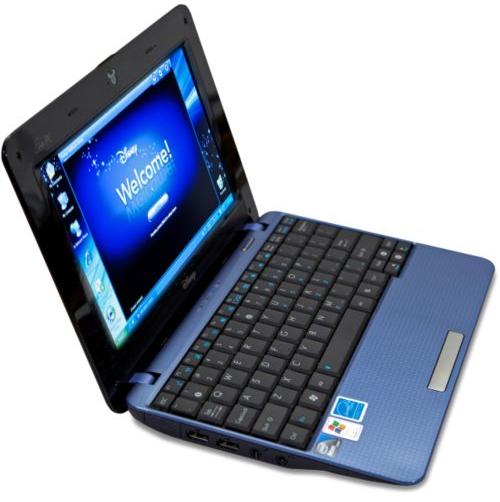
Disney Netbook


Another netbook for kids is ASUS’ Disney netbook, the Eee PC MK90 “Netpal”. From the Disney connection, you know that their target market are tech and internet savvy kids.
As with other 8.9-inch Eee PCs, the Netpal has a 1024 x 600 resolution display, Intel Atom N270 processor and 1GB of RAM, while storage is courtesy of a 16GB SSD.

There’s also WiFi b/g/n, three USB 2.0 ports and a 0.3-megapixel webcam, and the whole thing weighs in at 2.20lbs
It's light on the pocket compared to the previous netbook, but it sure is hefty for some kids at 2 lbs. Probably the makers are hoping that the adults will help lug this around with their kids? Nevertheless, if it's made by Disney expect that it will be porn-proof with some added security via parental control. It also has access to Radio Disney, so expect to hear a lot of cheesy songs once you give this to your kid.


Reblog this post [with Zemanta]