Hiển thị các bài đăng có nhãn temperature. Hiển thị tất cả bài đăng

Thứ Tư, 30 tháng 9, 2009

Some Interesting Modding Ideas

I modded my Aspire 4530 AGAIN to control resultant temperature.
Below are some ideas and pictures.


Another mod idea

This time a black anodized Aluminium heat sink (Can be found in any hardware store) is added to increase the mass.
I had to cut and file it to size.
On the plus side it had thermal adhesive tape under it which makes attaching it an easy task.

Chủ Nhật, 28 tháng 6, 2009

Crazy Stuff I Did To Lower The Temperature Of The Laptop

Here is the deal:
You have encounter high temperatures especially during gaming.
You contacted the Repair Centre.
They told you to update the BIOS (usually the fix include making the fan spin more often).
You have sent the laptop back and forth until you have given up.

Finally the warranty run out and you can only depend on yourself.

Below are the following mods you can do.


For me I did the following:

Note: Most steps require dismantling of the system it will help with expert supervision and googling and down loading of service manual to dismantle it.

  • Throw away the thermal pad on the GPU and use Arctic Silver 5 instead
  • Remove the original CPU thermal paste and use Arctic Silver 5 instead.
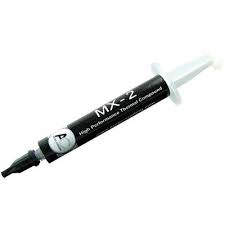
Arctic Cooling MX-2
Arctic Silver 5

  • Remove and throw away the "air filter" below the Laptop bottom cover to allow better air flow (I decided to do this after realizing this is the only part you can feel that air actually goes into the laptop, hence obstructing it restricts air flow hence remove it)
  • Sand the surface of heatsink which comes into contact with the GPU or CPU chip, using FINE SILICON CARBIDE PAPER
  • Sharpen the edges of the air vent casing (I got this inspiration by observing other Acer Aspire Laptop (Aspire 4935G) models, I noticed their vent size is gigantic compared to the vent size of this particular model hence it could be one of the gaming overheating factors. The new Acer Aspire 4736ZG Series Air Vents actually have even bigger holes than 4935G!)
Original (Top view)

Modified (Shave the vent corners)(Top view)

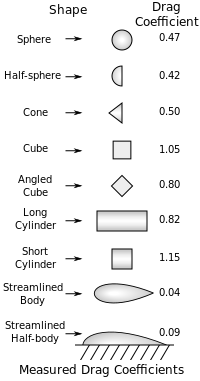
Actually the best cutting should be a wing shape pointing into the chassis.
The smaller the air drag the better.


Not sure how much of this helps
But now my gaming temperatures fall below 90 degrees (around 85) and my idle temperature falls below 60 degrees (around 55) for the GPU.

Check out my recently modded laptop thermal exhaust:

Compare it to your original Aspire 4530 exhaust spot any difference?
Originally it has 16 dividers I cut out 8 of them so it looks like this.

5) I added Aluminium tape to bridge the laptop bottom chassis which is made out of metal to the heatsink.


Aluminium Tape

How I did it.

I rolled and flatten out one piece of Aluminium Tape to thicken it made sure it stucked in between the two interface without falling off (but not too tight).
Then I stick a tape over the heatsink and the chassis for better conduction.
The lowest temperature is now under 55 degrees hence it pretty much works.


7) Set the Graphics Mode to performance.

Thứ Bảy, 27 tháng 6, 2009

Harddisk Temperature on Aspire 4530


HWMonitor currently does not detect Harddisk Temperature.
However HWiNFO32 does.
Here is a screenshot.


Thứ Sáu, 8 tháng 5, 2009

Result of Changing Thermal Paste


(Temperatures at idle)

This is the new temperature reading after I changed the thermal paste.
Notice the new low reading especially on the GPU.
The reason is because Acer uses a thermal pad to conduct heat away from the GPU which is pretty inefficient.
After I changed the thermal pad and the original thermal paste, which is silicon based, the new temperatures are lower.
Originally the Processor Temperature is 60-70degrees.
Now it is 50-60 degrees at normal load 40-50 at idle.
Original the GPU is nearly 70 degrees now it is nearly 60 degrees.
10 degrees difference that is a lot.

(Temperatures while Gaming)

The temperature for the GPU used to exceed 100 degrees when gaming as some of you have experienced
Now it even barely hits 90 degrees (With elevated platform to allow airflow).
Hence I recommend if you want to game, please replace the factory thermal paste with high quality ones like Arctic Silver 5 or MX-2 if you are able to get one.
Arctic Cooling MX-2 is better as it is non-conductive, no cure time required and easier to apply.
Dissembly Guide here.


Example of the thermal pad use to transfer heat from the GPU to heatsink


In the Acer Aspire 4530 Air enters the laptop through the bottom and exits through the rear so for better ventilation try to prop the laptop bottom on an elevated platform to improve thermal circulation.

Full Dissembly Guide here