Thứ Tư, 26 tháng 6, 2013

Thứ Năm, 13 tháng 6, 2013

GET BACK YOUR RECYCLE BIN


Recycle Bin is used to keep unnecessary files or folder. Some of my blog visitors asked about this problem that how they can get back their recycle bin after deleting it on windows XP.
You can use this method to get back recycle bin. 
Important Note.
For this purpose you will have to modify the Registry. It is strongly recommended that if you have some basic knowledge of registry then you can try it. Otherwise some serious problems might occur if you modify the Registry incorrectly. Now let’s try it. Follow these steps carefully to edit the registry to make the Recycle Bin icon reappear on your desktop.

i.  Click START and then click RUN
ii.  Now type “ regedit” and then click OK.
iii. Locate the following registry key
HKEY_LOCAL_MACHINE\SOFTWARE\Microsfot\windows\Current
version\Explorer\Desktop\namespace 
iv. Right click the registry key that you located in number(iii), Point to new and then click key.
v.  Now Type {645FF040-5081-101B-9F08-00AA002F954E} and press Enter.
vi.  After this click the new {645FF040-5081-101B-9F08-00AA002F954E} key.
vii. In the right, use your mouse to double click the default entry.
viii.   You will see a “Edit string dialog box”. Type Recycle Bin in the value data box and finally click OK.
ix.   Now close your registry Editor and check your desktop.
x.    You will see recycle Bin icon on your desktop wall. 


Thứ Tư, 22 tháng 5, 2013

OpenWRT Release Tagged


For users on fibre you can set port priority using swconfig
swconfig dev rtl8366rb port 1 set priority 1
To check 
 swconfig dev rtl8366rb port 1 get priority
To get it to run persistently on boot
echo 'swconfig dev rtl8366rb port 1 set priority 1' >> rc.local
This will only work on patched rtl8366rb drivers.
For unpatch openwrt firmware you have to use vconfig.

Updated to R37083

Attitude Adjustment with full ipv6 support including LuCI.
Downgrade the dhcpmasq to a non ipv6 version as the function is already added into the default Attitude Adjustment.
Review all the LuCI options and fix them, expose more wifi options.
This release is really a good one!.

For WR1043ND
"-Os  -pipe -march=24kc -mno-mips16 -mgp32 -fno-caller-saves -mno-branch-likely -mplt -msym32"

I also patched lighttpd to use
server.network-backend = "linux-sendfile"
server.event-handler = "linux-sysepoll"

This is done by patching the Makefile to enable linux-sendfile function which I do not know why it was disabled in OpenWRT's lighttpd Makefile.
I did it by #undef sendfile_broken and #define have_send_file

I managed to add the repo to github
OpenWRT  TL-WDR4300
OpenWRT TL-WR1043ND

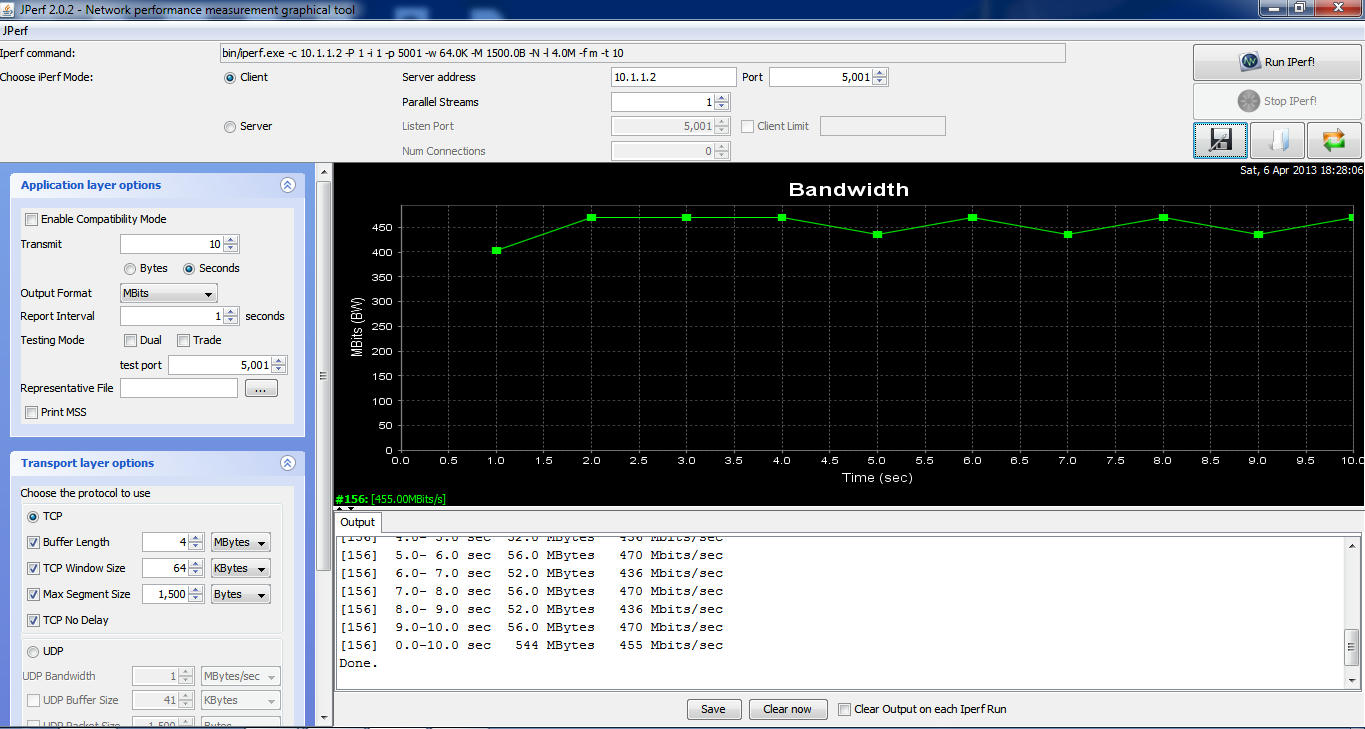
For my jperf (iperf +java frontend) I recorded increase in NAT speeds for both Routers but I would like those with highspeed internet to give me feedbacks.

Reminder: setting Wireless Region to 'US ' unlocks all "Wireless Goodness"

You can check updates on OpenWRT side using their development site.

Cheers!

Update:

Updates refreshed.
Removed Atheros Options since they are actually not support from documentation.
Integrate Jumbo Switch and Storm Filter since there are no issues.

Attitude Adjustment is Tagged and released!

I have also released a Beta version with Jumbo Frames and Storm Filtering
ssh into the router and use

swconfig dev rtl8366rb show (to display switch setting)

swconfig dev rtl8366rb set max_length 3

swconfig dev rtl8366rb set apply (apply the settings)

The rest you can figure out on your own using help option.

Note that the Jumbo Frame is a switch only option reason is that the AR9132 SoC DOES NOT SUPPORT JUMBO FRAME only the switch RTL8366RB do.

I have just release another update, changes are as follows:
-Rename some of the stuff in LuCI
-Removal of excess packages(torrents etc) now 1.8 MB left for you to install the stuff you want
  1. There is a lot of feedback from people who want to install specific packages for their own needs so the best way is to give them space to do that.
-Compress Javascript and CSS
-Update certain packages
-Rename PnP and uShare modules device information
-Remove pure-ftpd and added vsftpd with TLS
(managed to compile successfully and tested it)
  1. vsftpd with TLS does encrypted FTP using less flash and less RAM 
Added Port Monitoring Patches to the switch driver of both Routers

OpenWRT Attitude Adjustment Release For TL-WDR4300
LAN to WAN Wired Benchmark Software Routing


OpenWRT Attitude Adjustment Release for TL-WR1043ND
LAN to WAN Wired Benchmark Software Routing

With L7-Protocol and QoS (Default Configuration)


With L7-Protocol and QoS Service Stopped MSS disabled


Wireless LAN to WAN (2M Line of Sight)
With L7-Protocol and QoS Service Stopped MSS disabled
Using AES WPA2-PSK encryption 40MHZ Fat Channel, noscan enabled dtim_period=1
Basically what you can expect on Wireless.
Note: Results may vary due to interference of surrounding networks

    As usual
    Factory for upgrading from TP-LINK stock firmware to OpenWRT firmware
    Sysupgrade for upgrading from older OpenWRT version to newer OpenWRT version

    Thứ Ba, 21 tháng 5, 2013

    Installing Jellybean in Sony Live With Walkman ( WT19i) in Easy Steps.

    Step 1 : Unlock the bootloader, using the Sony's Tutorial
    Step 2 : Download The Flash Tool Here : http://androxyde.github.io/
    Step 3 : Download the Rooted Extended Stock Kernel. Link, Download CM10 for coconut and GAPPS  and copy it to the SDCARD.
    Step 4 : Connect the phone via flashmode ( Turn off and press Volume Down button while connecting to PC )
    Step 5 : Place the downloaded kernel to Firmware folder of the flashtool say (C:\Flashtool\firmwares)
    Step 6 : As soon as phone is detected in the flashtool as "Device is connected in flashmode") Flash the kernel by clicking on the flash button.
    Step 7 : Disconnect the phone and get into the recovery mode buy pressing the volume down button rapidly after seeing the Sony logo.
    Step 8: Select the option "Install Zip From sdcard" , in the recovery mode. then get into "Chose Zip From sdcard", Finally select the CM10 zip file and flash followed by the GAPPS file.
    Step 9. The reboot the system.. now you'll be in Cyanogenmod.

    Thứ Bảy, 13 tháng 4, 2013

    Download Subway Surfers and Temple Run For Armv6 Processor

    Subway Surfers


    Features:
    ★ Grind trains with your cool crew! 
    ★ Colorful and vivid HD graphics! 
    ★ Hoverboard Surfing! 
    ★ Paint powered jetpack! 
    ★ Lightning fast swipe acrobatics! 
    ★ Challenge and help your friends!

    Links
    Download Subway Surfers 


    Temple Run

    Hit IOS Game is finally now arrived on Android,so many peoples were eagerly waiting for this game for android and it is now arrived on android,and converted to armv6 for armv6 Android phones,I think i do not need to give intro about this game because its so famous,so finally waiting is over,i will just say download install and RUN...

    Links
    Download Temple Run

    Thứ Tư, 10 tháng 4, 2013

    Hide A Folder Without Hide Option ! (Invisible Folder)


    Everyone has certain files that s/he would rather keep private, especially guys. One of the ways to do that is to make such files hidden and bury them deep in the system files. The problem with such approach is that it’s not really conveninet if you need to access those files on a regular basis. So if you’re interested in something more conveninet, here are two simple ways to keep “important” files invisible and only a click a way.

    1. Make the Folder Invisible (not hidden)

    This works both on Windows XP and Vista, not sure about other Win versions. What this will do is make selected folder invisble, not hidden. The folder will be only visible when you try to highlight it (see below). If you want to make sure that no one discovers it by chance then also move it to the corner of the screen.


    How to Create Invisible Folder ?
      1. Create a new folder.
      2. Rename: Highlight the folder and Click ‘F2′ button. Hold the ‘Alt’ key and type in 0160 (you won’t see those 0160 numbers while typing them). Press Enter. Note, you have to use the numpad to enter these numbers.
      3. Change icon: Righ click the folder >> Properties >> Customize >> Change the icon >> Select the blank one >> Ok.

      4. Done.

    Decompile with Apk Tool With Easy Tool


    Requirements:

    ApkTool
    Java JDK/JRE 32 bit 
    Basic Cmd/terminal knowledge

    Download ApkTool here

    ApkTool.zip

    first you need to extract that zip folder to anywhere you choose, preferably on root of c/drive ie: C:/android/apktool extracting the files to 'apktool' folder

    Now place the STOCK framework-res.apk & whatever other apk's you would like to modify into the 'apktool' folder


    Getting to CMD directory


    Open up a Cmd Prompt (terminal) and get to the 'apktool' directory ie:


    Your cmd will probly look like this..

    C:\users\yourname>

    so type in

    cd.. (yes include the '..' and press enter after you type each command)

    this will get you to back directory so now you will see

    C:\users>

    so type again

    cd..

    you should now see this:

    C:\>

    now type in:

    cd 'apktoo'l/'directory'

    for me it looks like:

    cd android/apktool

    now you should see:

    C:/android/apktool>

    and you are in the apktool directory 

    Installing Framework

    Now that you are in directory we need to install the device's framework to your system for it to compile correctly so type this:

    apktool if framework-res.apk

    this will install the devices framework to your system (need to do this)


    Decompiling

    now to decompile the apk you want to edit.. type this:

    apktool d framework-res.apk framework1

    or

    apktool d music.apk music 

    music.apk is the apk your decompiling
    music is the folder you're creating for the decompiled apk

    now make your edits DO NOT Change/Edit ANY PNG's


    Recompiling/Finished Product

    now to recompile your new apk type this:

    apktool b music music-new.apk

    or

    apktool b framework1 framework-res-new.apk

    framework1 is the folder with your edited files
    framework-res-new.apk is your new apk file 

    Now we are NOT done... we cannot use the new apk's... we have to take what we did and add it back to the original apk file to keep proper signature 

    use something like 7zip, take the 'resources.arcs' file and any other xml files you edited out of the "-new" apk and copy them into Original apk 

    now the apk is ready to flash with your new changes